Staying connected when traveling abroad

On a recent trip to Europe, members of our team had to consider the ways to stay connected to the corporate office here in Colorado. The main issue was what to do when we were out and away from our computers during the day, as our main lifeline to the office were smartphones (iPhones, in this case). Both voice and data connectivity would be needed. After considering all the alternatives, we came up with a solution that worked for us.

I’ve been following discussions on this topic over the years, and my impression has been that there’s no ideal solution, so our goal was to find something that was good enough. Here are some of the standard suggestions I’ve come across:

  • Buy a prepaid SIM card for the country or countries you’ll be visiting. This usually provides the lowest rates, but requires that you use a new European phone number for the duration of the trip. People still needed to reach us on our U.S. cellphone numbers, however, so this was less than ideal. Additionally, our phones, for better or worse, are locked (a common situation with cellphones in the U.S.), so this wouldn’t work unless we bought or rented second, unlocked phones. But then we’d be carrying two phones.
  • Rent a phone with an internationally-friendly plan. This is similar to the solution above of buying a SIM card. Again, the disadvantages include having to use a new number and having to carry a second phone if we wanted people to be able to use our regular number, or if we wanted to use the apps on our regular smartphones.
  • Use our regular phones with our regular provider’s international plan. The advantage is that we could continue to use our regular phones and phone numbers. The disadvantage is that international voice rates are somewhat expensive — about $1.30/minute, although reducible to $1/minute if we activated a special $6/month feature on our plan. This, while somewhat expensive, was not out of the question. However, the rates for data roaming were exorbitant for any realistic use of data, and there are horror stories of people coming home to huge data bills after international trips.

So our solution? Here’s what we ended up doing:

  • We decided to activate our provider’s international calling feature as described above. This allowed us to keep using our regular phone numbers and our existing phones. For inbound calls, people could call us on this number (so we wouldn’t need to distribute new numbers to a large number of contacts), and if the call was likely to be long, we would call back using Skype (see below). The voice charges using our provider’s plan turned out to be manageable. We turned off data roaming on our phones to avoid the high data roaming charges.
  • For most outbound calls, we used Skype. Calls to other Skype users were free, and calls to any other number were only 2.3 cents/minute, which is quite reasonable. The Skype apps for the iPhone and iPad worked quite well, and we had no trouble reaching non-Skype numbers. Skype-based text messaging to European cellphone numbers failed, and we would advise people not to rely on it. Inbound Skype calls worked surprisingly well — the apps ran in the background and popped up an alert when someone tried to call us on our Skype account.
  • Skype requires an Internet connection. All the places we stayed had free Wi-Fi, so it wasn’t a problem using Skype or just accessing data during the time we were in our rooms, but that still meant that we would need data connections during the large parts of the day where we were out and about. Fortunately, there was one last piece of the puzzle that made it all work:
  • Not too long before we left, we came across a company named XCom Global, based in San Diego. They rent out MiFi units (small devices that create Wi-Fi hotspots and hook into the local 3G/4G network). We’re familiar with MiFis, as one of us has a Virgin Mobile MiFi device that works well for travels in the U.S. What XCom Global does is rent out MiFi devices for just about anywhere in the world, and the rental price includes an unlimited data plan. For $15/day, we were able to rent a MiFi that worked in continental Europe and the UK. The unit came with two rechargeable batteries, so we were able to turn it on when we left for the day, put it in a pocket or a bag, and replace one battery when the other one ran out. Using this strategy, we had mobile wireless data access, including Skype, with good performance, for the entire day.

Through careful research and planning, we were able to fashion a workable strategy that gave us good voice and data connectivity abroad at a reasonable price, while allowing us to use our existing phones and mobile phone numbers. To summarize, the elements of our solution included:

  • Our regular mobile provider’s international plan, for brief inbound calls (but be sure to turn data roaming off),
  • Skype, for outbound calls and inbound Skype-to-Skype calls, and
  • XCom Global’s MiFi rental, for mobile wireless data connectivity when out and about during the day.

I can’t guarantee it will serve everyone’s needs, but for those of you who have similar requirements to ours, this could be a good solution. What solutions or suggestions have you used or do you suggest?

Using the JNBridge JMS BizTalk Adapter with Oracle RIB and AQ

Oracle RIB (Retail Information Bus) is a message-based integration platform peaked for retail outlets. The messaging layer is Java Message Service, and the messaging provider is Oracle AQ.  One of the enterprise solutions that’s frequently integrated with Oracle RIB is Microsoft’s BizTalk Server. While the JNBridge JMS Adapter for BizTalk is a key component enabling this integration, Oracle RIB presents an integration challenge for stand-alone JMS clients like the adapter. This blog entry will discuss how to integrate Oracle RIB to BizTalk Server using the JMS adapter, but first it might be worthwhile to understand the particular problems with integrating stand-alone JMS clients.

Stand-alone JMS clients

JMS clients usually execute in a Java EE container within an application server, for example a Message Driven Bean. The container provides services to the client including transaction enlistment and implicit naming environments. A generic stand-alone JMS client does not execute in a container and must explicitly use the Java Naming and Directory Interface (JNDI) to acquire connection factories and destinations. Because of this, stand-alone JMS clients often require special libraries—the JAR files in the classpath—and configuration properties that are different from those used for a MDB. Some vendors, like IBM, and some products, like WebLogic, provide special thin-client JAR files. For other vendors, it is necessary to choose a subset of JAR files from the Java EE server implementation, copying them to the JMS client machine. Most times, the vendor will actually publish the required JAR files for each version, other times it is necessary to build the class path one ClassNotFoundException at a time.

Depending on the implementation of the JMS server, a stand-alone client may not have access to a JNDI service. Some JMS implementations don’t provide JNDI, relying instead on the host Java EE application server to provide naming and directory services. If the JMS implementation is not integrated into an application server, but is running as a stand-alone broker, all clients must access connection factories and destinations through proprietary APIs. That’s fine, but it isn’t portable, which is the whole idea behind the JMS specification.

Oracle AQ is an example of a JMS implementation that can run as a stand-alone broker or run in a Java EE application server like Oracle WebLogic. This blog will address both scenarios: a stand-alone JMS client, in this case the JNBridge JMS Adapter for BizTalk Server, connecting to Oracle AQ as a stand-alone broker and as a JMS service provider within WebLogic. As we’ll see, both scenarios require some extra work to support a stand-alone JMS client.

Oracle AQ configured as a Foreign Server within WebLogic

Generally speaking, the JMS specification was intended as an API that provides a generic surface on proprietary messaging middleware. The JMS surface is provided by a Java EE application server which also provides JNDI, another generic API for obtaining connection factories and destinations. Usually, the integration of the messaging provider to JMS and JNDI within the application server is accomplished by a Java Connection Architecture resource adapter. However, the preferred method required by Oracle RIB for integrating Oracle AQ to WebLogic is to configure the message provider as a foreign server.

Oracle AQ uses an Oracle Database as its message store, mapping destinations to tables. Because of the transactional nature of the DB, a Java Data Source is used in the foreign server configuration. A data source automatically handles DB transactions by enlisting in a transaction handled by the Java EE transaction manager, a service provided by WebLogic. This works well when the JMS client is executing in a Java EE container because the data source provides the transactional support. However, a stand-alone client is unable to use a data source because there’s no transaction manager available—it’s executing outside the transactional scope. While a JMS client can use local transactions, either explicitly calling commit or rollback, it cannot participate in a distributed transaction.

Foreign Server using a Data Source

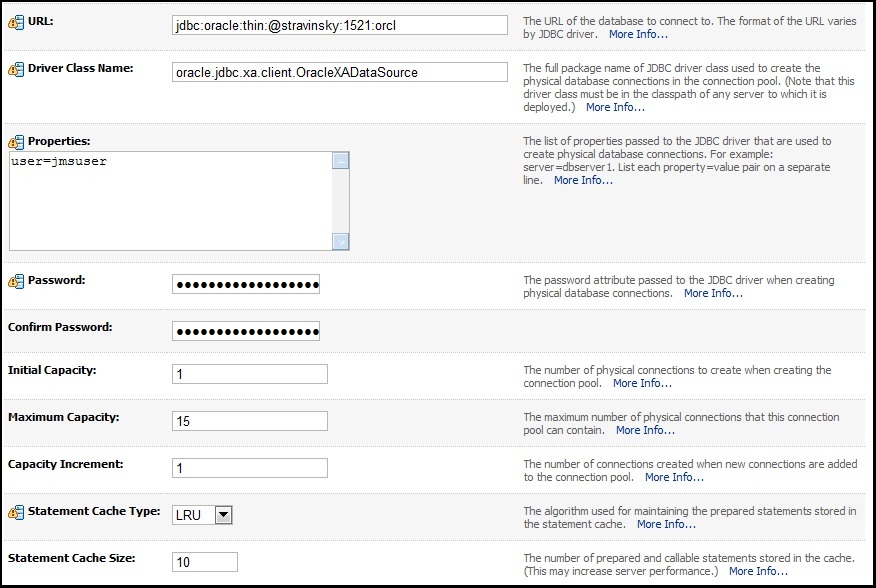
Using WebLogic 10.3 and Oracle AQ 11.2, the configuration as a foreign server starts with configuring the data source.  A data source for an Oracle DB is a transaction aware wrapper around the database connection URL. This screen shot shows the data source configuration within WebLogic. Note the standard Oracle connection URL at the top with the default SID, orcl.

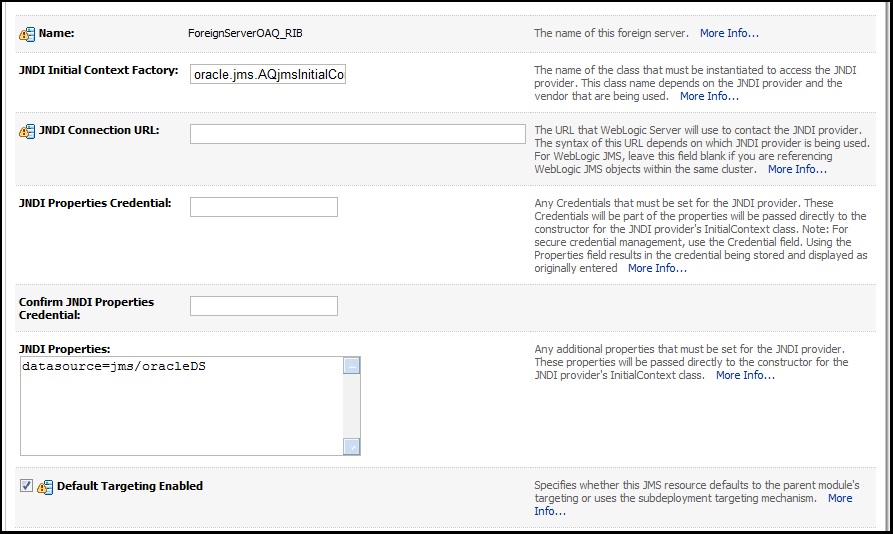
Here’s a screen shot of the foreign server configuration using  the above data source which has been mapped to the JNDI name, jms/oracleDS.

This foreign server configuration will work fine for JMS clients executing inside containers in WebLogic. However, if a stand-alone JMS client attempts to connect to WebLogic, this exception is thrown.

cannot assign instance of weblogic.jdbc.common.internal.RmiDataSource_1033_WLStub to field oracle.jms.AQjmsConnectionFactory.data_source of type javax.sql.DataSource in instance of oracle.jms.AQjmsXATopicConnectionFactory

 Foreign Server using a Connection URL

The problem is the data source. If the foreign server configuration does not use a data source, but instead uses the connection URL, then the stand-alone JMS client will be able to connect. The following screen shot shows the foreign server configuration using a connection URL instead of a data source.

Mutually Exclusive: Requires Two Foreign Servers

Now, a stand-alone JMS client can connect to WebLogic and access Oracle AQ queues and topics. However, a JMS client running inside a container in WebLogic cannot use this foreign server configuration. The internal JMS client requires a data source to provide transaction enlistment. The solution is to configure two foreign servers, one using a data source for the WebLogic JMS clients, the other using a connection URL for the external stand-alone JMS clients. Each foreign server configuration will have its own connection factory with a unique JNDI name. Each foreign server will also point to the same Oracle AQ queues or topics, but will use unique JNDI names.

The configuration for the JNBridge JMS Adapter for BizTalk when using Oracle AQ configured as a WebLogic Foreign Server can be found here.

 Oracle AQ as a stand-alone broker.

The JMS specification is a generic interface, but there is no specified mechanism for obtaining connection factories or destinations. Generic access is usually provided by JNDI, however the specification does not preclude a non-JNDI mechanism, i.e. a proprietary extension. Oracle AQ is an example of a JMS implementation that doesn’t require JNDI if it is running as a stand-alone broker. However, because the API for creating connection factories and accessing destinations is proprietary, the JNBridge JMS Adapter for BizTalk can only support stand-alone Oracle AQ if there is a JNDI service available.

One way to get around this problem is to write a Java wrapper that mimics JNDI, but uses the Oracle AQ API to create and return connection factories and destinations. JNDI requires the implementation of two Java naming interfaces, InitialContextFactory and Context. When a Java EE client requires remote access to objects in the JNDI repository, it creates an InitialContext from the InitialContextFactory. The client then uses the InitialContext to look-up connection factories and destinations. The InitialContextFactory must implement the method getInitialContext(). Here’s the Java code for that method.

import java.util.Hashtable;
import java.util.Properties;
import javax.naming.Context;
import javax.naming.NamingException;
import java.net.URI;
public Context getInitialContext(Hashtable<?, ?> environment)
throws NamingException
{
String dbURL = this.getDBURL(environment);
String hostname = this.getHostname(environment);
int port = this.getPort(environment);
String sid = this.getSID();
String username = this.getUsername(environment);
String password = this.getPassword(environment);
OAQContext oaqCtx = null;
try {
oaqCtx = new OAQContext(hostname, username, password, sid, port);
}
catch (Exception ex) {
throw new NamingException(“Unable to create OAQContext: ” + ex.getMessage());
}
return oaqCtx;
}

This method simply parses the Hashtable object, environment, that’s an argument to the InitialContext constructor. The JMS Adapter for BizTalk constructs the Hashtable object, populating it with connection values, passing it as an argument to the InitialContext constructor in the factory class where the  method getInitialContext() is invoked. The method then creates an instance of OAQContext passing in the connection properties, where they’re stored in instance variables, and returns it. The OAQContext object is an implementation of the Context interface and therefore must implement the lookup() method.

Here’s the implementation for lookup(), notice the casts of the interface javax.jms.Session to the subclass AQjmsSession. This allows the code to invoke the proprietary methods getQueue() and getTopic().

import java.util.Hashtable;
import java.util.Properties;
import javax.naming.Binding;
import javax.naming.Context;
import javax.naming.Name;
import javax.naming.NameClassPair;
import javax.naming.NameParser;
import javax.naming.NamingEnumeration;
import javax.naming.NamingException;
import oracle.AQ.*;
import oracle.jms.*;
import javax.jms.*;
public Object lookup(String name) throws NamingException
{
ConnectionFactory cf = null;
Connection connection = null;
Session session = null;
Object rtn = null;
cf = this.getCF(name);
if (name.equalsIgnoreCase(“QueueConnectionFactory”) || name.equalsIgnoreCase(“TopicConnectionFactory”))
{
rtn = cf;
}
else {
try {
connection = cf.createConnection(this.username, this.password);
session = connection.createSession(false, Session.AUTO_ACKNOWLEDGE);
}
catch (Exception ex) {
throw new NamingException(“Unable to create a connection and session: “ + ex.getMessage());
}
try {
Queue q = ((AQjmsSession)session).getQueue(this.username, name);
rtn = q;
}
catch(Exception ex) { }
if ( rtn == null) {
try {
Topic t = ((AQjmsSession)session).getTopic(this.username, name);
rtn = t;
}
catch (Exception ex) { }
}
}
if ( session != null) {
try {
session.close();
}
catch (JMSException e) { }
}
if ( connection != null) {
try {
connection.close();
}
catch (JMSException e) { }
}
if (rtn == null) {
throw new NamingException(“Unable to find object: “ + name);
}
return rtn;
}

The private method getCF() creates a ConnectionFactory object using the Oracle AQ API. If the name of the object to look-up matches the the name “QueueConnectionFactory” or “TopicConnactionFactory”, then the appropriate connection factory is returned. In the lookup() method, if a queue or topic name is the target of the look-up, then the connection factory is used to create a connection followed by a session. This is the private method getCF().

private ConnectionFactory getCF(String name) throws NamingException
{
ConnectionFactory cf = null;
try
{
if (name.equalsIgnoreCase(“QueueConnectionFactory”)) {
cf = AQjmsFactory.getQueueConnectionFactory(this.hostname, this.sid, this.port, “thin” );
}
else if (name.equalsIgnoreCase(“TopicConnectionFactory”)) {
cf = AQjmsFactory.getTopicConnectionFactory(this.hostname, this.sid, this.port, “thin” );
}
else {
cf = AQjmsFactory.getConnectionFactory(this.hostname, this.sid, this.port, “thin” );
}
}
catch (Exception ex) {
throw new NamingException(“Unable to get OAQ connection factory: “ + ex.getMessage());
}
return cf;
}

The two classes, com.jnbridge.adapters.oaq.InitialContextFactory and com.jnbridge.adapters.oaq.OAQContext must be archived in a JAR file and added to the class path property in the BizTalk transport handlers. In order to correctly build the connection URL for the Oracle Database behind AQ, the Oracle SID must be used. For example, this connection URL,

jdbc:oracle:thin:@stravinsky:1521:etude

has a SID name of etude. While the other values in the connection URL can be obtained from the InitialContext constructor argument, the SID name must use a system property. System properties can be defined and set using arguments to the Java Virtual Machine. For that reason, when configuring the JMS Adapter in BizTalk, the JVM Arguments property in the BTS transport handlers must supply this argument:

-Dcom.jnbridge.adapters.oaq.dbname=[OracleSID]

For more information on configuring the JNBridge JMS Adapter for BizTalk using the JNDI wrapper, please go here.

To download the source for the JNDI wrapper, please go here.

For more information on configuring Oracle AQ as a foreign server in Oracle WebLogic (albeit using a data source), please go here.


Creating .NET-based Mappers and Reducers for Hadoop with JNBridgePro

You can download the source code for the lab here.

Summary

The Apache Hadoop framework enables distributed processing of very large data sets. Hadoop is written in Java, and has limited methods to integrate with “mapreducers” written in other languages. This lab demonstrates how you can use JNBridgePro to program directly against the Java-based Hadoop API to create .NET-based mapreducers.

Hadoop mapreducers, Java, and .NET

Apache Hadoop (or Hadoop, for short) is an increasingly popular Java-based tool used to perform massively parallel processing and analysis of large data sets. Such large data sets requiring special processing techniques are often called “Big Data.” The analysis of very large log files is a typical example of a task suitable for Hadoop. When processed using Hadoop, the log files are broken into many chunks, then farmed out to a large set of processes called “mappers,” that perform identical operations on each chunk. The results of the mappers are then sent to another set of processes called “reducers,” which combine the mapper output into a unified result. Hadoop is well-suited to running on large clusters of machines, particularly in the cloud. Both Amazon EC2 and Microsoft Windows Azure, among other cloud offerings, either provide or are developing targeted support for Hadoop.

In order to implement the functionality of a Hadoop application, the developer must write the mappers and reducers (sometimes collectively called “mapreducers”), then plug them into the Hadoop framework through a well-defined API. Because the Hadoop framework is written in Java, most mapreducer development is also done in Java. While it’s possible to write the mapreducers in languages other than Java, through a mechanism known as Hadoop Streaming, this isn’t an ideal solution as the data sent to the mapreducers over standard input needs to be parsed and then converted from text to whatever native form is being processed. Handling the data being passed through standard input and output incurs overhead, as well as additional coding effort.

The alternative that we present in this lab is a way to create .NET-based mapreducers by programming against the Hadoop API using JNBridgePro. In this lab, the .NET-based mapreducers run in the actual Hadoop Java processes (which is possible if the Hadoop cluster is running on Windows machines), but we will also discuss ways to run the .NET sides outside the Java processes. In this example, we show how to host the maximal amount of mapreducer functionality in .NET, although you could use the same approach to host as much or as little of the functionality in .NET as you like, and host the rest in Java. You will come away with an understanding of how to create .NET-based Hadoop mapreducers and deploy them as part of a Hadoop application. The code we provide can be used as a pattern upon which you can create your own .NET-based mapreducers.

You might want or need to write mapreducers in .NET for a number of reasons. As examples, you might have an investment in .NET-based libraries with specialized functionality that needs to be used in the Hadoop application. Your organization may have more developers with .NET skills than with Java skills. You may be planning to run your Hadoop application on Windows Azure, where, even though the Hadoop implementation is still in Java and there is support for Java, the majority of the tooling is far more friendly to .NET development.

This lab is not a tutorial in Hadoop programming, or in deploying and running Hadoop applications. For the latter, there is a good tutorial here. The tutorial refers to some older versions of Eclipse and Hadoop, but will work with more recent versions. Even if you’re familiar with Hadoop, the example builds on some of the setup in the tutorial, so it might be worth working through the tutorial beforehand. We will point out these dependencies when we discuss how the Hadoop job should be set up, so you can decide whether to build on top of the tutorial or make changes to the code in the lab.

Example

The lab is based on the standard “word count” example that comes with the Hadoop distribution, in which the occurrences of all words in a set of documents are counted. We’ve chosen this example because it’s often used in introductory Hadoop tutorials, and is usually well understood by Hadoop programmers. Consequently, we won’t spend much time talking about the actual functionality of the example: that is, how the word counting actually works.

What this example does is move all the Java-based functionality of the “word count” mapreducers into C#. As you will see, we need to leave a small amount of the mapreducer in Java as a thin layer. Understanding the necessity of this thin layer, and how it works, provides a design pattern that can be used in the creation of other .NET-based mapreducers.

Interoperability strategy

At first glance, the apparent approach to interoperability would be to use JNBridgePro to proxy the Java-based Mapper and Reducer interfaces and the MapReduceBase abstract class into .NET, then program in C# against these proxies. Then, still using JNBridgePro, proxy the .NET-based mapper and reducer classes, and register those proxies with the Hadoop framework. The resulting project would use bidirectional interoperability and would be quite straightforward. Unfortunately, this approach leads to circularities and name clashes: the proxied mapper and reducer will contain proxied parameters with the same name as the actual Java-based Hadoop classes. In other words, there will be proxies of proxies, and the result will not work. While it is possible to edit the jar files and perform some other unusual actions, the result would be confusing and would not work in all cases. So we need to take a different approach.

Instead, we will create thin Java-based wrapper classes implementing the Mapper and Reducer interfaces, which will interact with the hosting Hadoop framework, and which will also call the .NET-based functionality through proxies, making this a Java-to-.NET project. In the cases where the .NET functionality needs to access Java-based Hadoop objects, particularly OutputCollectors and Iterators, it will be done indirectly, through callbacks. The resulting code is much simpler and more elegant.

The original WordCount example

Let’s start with the original Java-based “word count” mapper and reducer, from the example that comes with Hadoop. We will not be using this code in our example, and we will not be discussing how it works (it should be fairly straightforward if you’re familiar with Hadoop), but it will be useful as a reference when we move to the .NET-based version.

Here is the mapper:

/**
* WordCount mapper class from the Apache Hadoop examples.
* Counts the words in each line.
* For each line of input, break the line into words and emit them as
* (word, 1).
*/
public class WordCountMapper extends MapReduceBase
implements Mapper<LongWritable, Text, Text, IntWritable> {
private final static IntWritable one = new IntWritable(1);
private Text word = new Text();
public void map(LongWritable key, Text value,
OutputCollector<Text, IntWritable> output,
Reporter reporter) throws IOException {
String line = value.toString();
StringTokenizer itr = new StringTokenizer(line);
while (itr.hasMoreTokens()) {
word.set(itr.nextToken());
output.collect(word, one);
}
}

}

And here is the reducer:

/**
* From the Apache Hadoop examples.
* A WordCount reducer class that just emits the sum of the input values.
*/
public class WordCountReducer extends MapReduceBase
implements Reducer<Text, IntWritable, Text, IntWritable> {
public void reduce(Text key, Iterator<IntWritable> values,
OutputCollector<Text, IntWritable> output,
Reporter reporter) throws IOException {
int sum = 0;
while (values.hasNext()) {
sum += values.next().get();
}
output.collect(key, new IntWritable(sum));
}

}

Migrating the functionality to .NET

What we want to do next is migrate as much of the mapper and reducer functionality as possible to .NET (in this case, C#) code. Note that we can’t migrate all of it verbatim; the Java code references Hadoop-specific classes like Text, IntWritable, LongWritable, OutputCollector, and Reporter, as well as other crucial Java classes such as Iterator. Text, IntWritable, and LongWritable can be easily converted to string, int, and long, which are automatically converted by JNBridgePro. However, while it is possible to convert classes like OutputCollector and Iterator to and from native .NET classes like ArrayList, such conversions are highly inefficient, since they involve copying every element in the collection, perhaps multiple times. Instead, we will continue to use the original OutputCollector and Iterator classes on the Java side, and the .NET code will only use them indirectly, knowing nothing about the actual classes. Callbacks provide a mechanism for doing this.

Here is the C# code implementing the mapper and reducer functionality:

namespace DotNetMapReducer
{

// used for callbacks for the OutputCollector
public delegate void collectResult(string theKey, int theValue);
// used for callbacks to the Iterator
public delegate object getNextValue();
// returns null if no more values, returns boxed integer otherwise
public class DotNetMapReducer
{
public void map(string line, collectResult resultCollector)
{
StringTokenizer st = new StringTokenizer(line);
while (st.hasMoreTokens())
{
string nextToken = st.nextToken();
resultCollector(nextToken, 1);
}
}
public void reduce(string key, getNextValue next, collectResult resultCollector)
{
int sum = 0;
object nextValue = next(); // get the next one, if there
while (nextValue != null)
{
sum += (int)nextValue;
nextValue = next();
}

resultCollector(key, sum);
}
}
public class StringTokenizer
{
private static char[] defaultDelimiters = { ‘ ‘, ‘t’, ‘n’, ‘r’, ‘f’ };
private string[] tokens;
private int numTokens;
private int curToken;
public StringTokenizer(string line, char[] delimiters)
{
tokens = line.Split(delimiters);
numTokens = tokens.Length;
curToken = 0;
}
public StringTokenizer(string line)
: this(line, defaultDelimiters)
{
}
public bool hasMoreTokens()
{
if (curToken < numTokens) return true;
else return false;
}
public string nextToken()
{
if (hasMoreTokens()) return tokens[curToken++];
else throw new IndexOutOfRangeException();
}
}

}

StringTokenizer is just a .NET-based reimplementation of the standard Java StringTokenizer class, and we won’t be discussing it further.

Note the two delegates collectResult and getNextValue that are used by the mapreducer. These are ways to call back into the Java code for additional functionality, possibly using classes like OutputCollector and Iterator that the .NET code knows nothing about. Also note that the .NET code uses string and int where the Java code had Text and IntWritable (and LongWritable); the wrapper code will handle the conversions.

Once we have the .NET functionality built and tested, we need to proxy the mapreducer class and supporting classes. We then incorporate the proxy jar file, jnbcore.jar, and bcel-5.1-jnbridge.jar into our Java Hadoop project and can start writing the Java-based mapper and reducer wrappers. Here they are:

public class MapperWrapper extends MapReduceBase

implements Mapper<LongWritable, Text, Text, IntWritable> {
private static MapReducerHelper mrh = new MapReducerHelper();
private DotNetMapReducer dnmr = new DotNetMapReducer();
public void map(LongWritable key, Text value,
OutputCollector<Text, IntWritable> output,
Reporter reporter) throws IOException {
OutputCollectorHandler och = new OutputCollectorHandler(output);
dnmr.map(value.toString(), och);
Callbacks.releaseCallback(och);
}

}

public class ReducerWrapper extends MapReduceBase

implements Reducer<Text, IntWritable, Text, IntWritable> {
private static MapReducerHelper mrh = new MapReducerHelper();
private DotNetMapReducer dnmr = new DotNetMapReducer();
public void reduce(Text key, Iterator<IntWritable> values,
OutputCollector<Text, IntWritable> output,
Reporter reporter) throws IOException {
IteratorHandler ih = new IteratorHandler(values);
OutputCollectorHandler och = new OutputCollectorHandler(output);
dnmr.reduce(key.toString(), ih, och);
Callbacks.releaseCallback(ih);
Callbacks.releaseCallback(och);
}

}

Note that the only purpose of these thin wrappers is to interface with the Hadoop framework, host the .NET-based functionality, and handle passing of values to and from the .NET components (along with necessary conversions).

There are two callback objects, IteratorHandler and OutputCollectorHandler, which encapsulate the Iterator and OutputCollector objects. These are passed where the .NET map() and reduce() methods expect delegate parameters, and are used to hide the actual Hadoop Java types from the .NET code. The mapreducer will simply call the resultCollector() or getNextValue() delegate, and the action will be performed, or value returned, without the .NET side knowing anything about the mechanism used by the action.

Since callbacks consume resources (particularly, a dedicated thread for each callback object), and there can be many invocations of map() and reduce(), it is important to release the callback objects (using the Callbacks.releaseCallback() API) to release those threads when they are no longer needed. If you do not make those calls, performance will degrade substantially.

Here is the Java code for the two callback classes:

public class OutputCollectorHandler implements collectResult
{

private OutputCollector<Text, IntWritable> outputCollector = null;
public OutputCollectorHandler(OutputCollector<Text, IntWritable>
theCollector)
{
outputCollector = theCollector;
}
public void Invoke(String theKey, int theValue)
{
try
{
outputCollector.collect(new Text(theKey),
new IntWritable(theValue));
}
catch(IOException e)
{
// not sure why it would throw IOException anyway
}
}

}

import System.BoxedInt;
import System.Object;

public class IteratorHandler implements getNextValue
{

private Iterator<IntWritable> theIterator = null;
public IteratorHandler(Iterator<IntWritable> iterator)
{
theIterator = iterator;
}
// returns null if no more values, otherwise returns a boxed integer
public Object Invoke()
{
if (!theIterator.hasNext()) return null;
else
{
IntWritable iw = theIterator.next();
int i = iw.get();
return new BoxedInt(i);
}
}

}

The two callback objects encapsulate the respective Java collections and perform the appropriate conversions when their Invoke() methods are called. The IteratorHandler, rather than providing the typical hasNext()/getNext() interface, has a single Invoke() method (this is how callbacks work in Java-to-.NET projects), so we’ve written Invoke() to return null if there are no more objects, and to return the integer (boxed, so that it can be passed in place of a System.Object), when there is a new value. There are other ways you can choose to do this, but this method will work for iterators that return primitive objects.

Finally, we need to configure JNBridgePro. For maximum flexibility, we’ve chosen to configure it programmatically, through the MapReducerHelper class. Since configuration can only happen once in each process, and must happen before any proxy call, we’ve created MapReducerHelper to perform the configuration operation inside its static initializer, which is executed when the class is loaded. This will happen only once per process and is guaranteed to be done before any proxies are called. Here is Java-based MapReducerHelper:

public class MapReducerHelper

{
static
{
Properties p = new Properties();
p.put(“dotNetSide.serverType”, “sharedmem”);
p.put(“dotNetSide.assemblyList.1”,
“C:/DotNetAssemblies/DotNetMapReducer.dll”);
p.put(“dotNetSide.javaEntry”,
“C:/Program Files/JNBridge/JNBridgePro v6.0/4.0-targeted/JNBJavaEntry.dll”);
p.put(“dotNetSide.appBase”,
“C:/Program Files/JNBridge/JNBridgePro v6.0/4.0-targeted”);
DotNetSide.init(p);
}

}

The paths in the configuration will likely be different in your deployment, so you will need to adjust them accordingly.

Finally, we create the Java-based Hadoop driver in the usual way, specifying the new wrappers as the mapper and reducer classes:

public class WordCountDotNetDriver
{

public static void main(String[] args)
{
JobClient client = new JobClient();
JobConf conf = new JobConf(WordCountDotNetDriver.class);
// specify output types
conf.setOutputKeyClass(Text.class);
conf.setOutputValueClass(IntWritable.class);
conf.setInputFormat(TextInputFormat.class);
conf.setOutputFormat(TextOutputFormat.class);
// specify input and output DIRECTORIES (not files)
FileInputFormat.setInputPaths(conf, new Path(“In”));
FileOutputFormat.setOutputPath(conf, new Path(“Out”));
// specify a mapper
conf.setMapperClass(MapperWrapper.class);
conf.setCombinerClass(ReducerWrapper.class);
// specify a reducer
conf.setReducerClass(ReducerWrapper.class);
client.setConf(conf);
try {
JobClient.runJob(conf);
} catch (Exception e) {
e.printStackTrace();
}
}

}

Deploying and running the Hadoop application

At this point we can deploy and run the application. Start by deploying the application to your Hadoop cluster. (It needs to be a cluster of Windows machines, since we’re using shared memory. We’ll talk about Linux clusters later.) If you have a setup like the one described in the aforementioned tutorial, just copy the source files over and build.

Make sure that the appropriate version (x86 or x64, depending on whether you’re running your Hadoop on 32-bit or 64-bit Java) of JNBridgePro is installed on all the machines in the cluster and that an appropriate license (which may be an evaluation license) is installed, and make sure that the dotNetSide.javaEntry and dotNetSide.appBase properties in MapReducerHelper agree with the installed location of JNBridgePro. If not, either install JNBridgePro in the correct place, or edit MapReducerHelper and rebuild.

You will need to put the proxy jar file as well as jnbcore.jar and bcel-5.1-jnbridge.jar in the Hadoop classpath. There are a couple of ways to do this. You can add the paths to these files to the HADOOP_CLASSPATH environment variable. Alternatively, you can copy these jar files to the Hadoop lib folder.

Finally, copy to each machine in the Hadoop cluster the .NET DLL file containing the .NET classes, and put it in the location specified in the dotNetSide.assemblyList.1 property in MapReducerHelper.

Once this is all done, start up all your Hadoop nodes. Make sure that in your HDFS service you’ve created a directory “In”, and that you’ve uploaded all the .txt files in the root Hadoop folder: mostly licensing information, release notes, and readme documents. Feel free to load additional documents. If there is an “Out” directory, delete it along with its contents. (If the “Out” directory exists when the program is run, an exception will be thrown.)

Now, run the Hadoop application. It will run to completion, and you will find an HDFS folder named “Out” containing a document with the result.

The Hadoop job that you just ran worked in exactly the same way as any ordinary all-Java Hadoop job, but the mapreducer functionality was written in .NET and was running in the same processes as the rest of the Hadoop framework. No streaming was required to do this, and we were able to program against native Hadoop APIs.

Running the Hadoop job on Linux machines

As we’ve chosen to run the Hadoop application using JNBridgePro shared memory communications, we need to run our Hadoop cluster on Windows machines. This is because the .NET Framework needs to be installed on the machines on which the Hadoop processes are running.

It is possible to run the application on a cluster of Linux machines, but you will need to change the configuration to use tcp/binary communications, and then run .NET-side processes on one or more Windows machines. The simplest way to run a Java side is to configure and use the JNBDotNetSide.exe utility that comes with the JNBridgePro installation. Configure each Java side to point to one of the .NET-side machines. You can share a .NET side among multiple Java sides without any problem, although the fewer Java sides talking to each .NET side, the better performance you will get.

Note that changing from shared memory to tcp/binary does not require any changes to your .NET or Java code. You can use the same binaries as before; you only need to change the configuration.

Conclusion

This lab has shown how you can write .NET-based Hadoop mapreducers without having to use Hadoop streaming or implement parsing of the stream. The .NET code can include as much or as little of the mapreducer functionality as you desire; the rest can be placed in Java-based wrappers. In the example we’ve worked through, the .NET code contains all of the mapreducer functionality except for the minimal functionality required for connectivity with the Hadoop framework itself. The .NET code can run in the same processes as the rest of the Hadoop application (in the case that Hadoop is running on a Windows cluster), or on different machines if Hadoop is running on a Linux cluster.

You can use the example code as a generalized pattern for creating the wrappers that connect the Hadoop framework to the .NET-based mapreducers. The code is simple and straightforward, and variants will work in most mapreduce scenarios.

You can enhance the provided code for additional scenarios. For example, if you want to use tcp/binary, you can modify the Java-side configuration (in class MapReducerHelper) so that any specific instance of the Java side can choose to connect to one of a set of .NET sides running on a cluster; the assignments do not have to be made by hand. You can also use the provided code to support tight integration of .NET mapreducers in a Hadoop application running on Windows Azure. This approach provides more flexibility and improved performance over the Hadoop streaming used by the Azure implementation.

We expect that the provided code and design patterns will be useful in many scenarios we haven’t even thought of. We’d love to hear your comments, suggestions, and feedback – you can contact us at labs@jnbridge.com.

You can download the source code for the lab here.

JNBridgePro and Windows 7

A number of our users have begun using Windows 7. You’ll be happy to know that JNBridgePro works fine with Windows 7, with a few caveats. Here’s where things stand with the current version (4.1.0):

32-bit JNBridgePro: 32-bit JNBridgePro works just fine with Windows 7. The product installs smoothly, and the proxy generators work, as do the Visual Studio and Eclipse plug-ins. The only caveat is that if you are using shared memory and Java 6, you might see a message that contact with the Java side could not be made because msvcr71.dll is missing. This is actually a well-known issue with Java (see detailed discussion of the problem here), and is the result of some very questionable design decisions by Sun; it has nothing directly to with JNBridgePro. The solution to the problem is to find a copy of msvcr71.dll (you can find one in the JDK 1.6’s bin folder), and place it in WindowsSystem32 (or WindowsSysWow64 if it’s a 64-bit operating system). When that is done, the problem will go away. Finally, all applications that use JNBridgePro will work fine; if the applications use shared memory and Java 6, add msvcr71.dll as described above.

64-bit JNBridgePro: In the 64-bit version of JNBridgePro, the installer will show an error when installing the Visual Studio plug-in. Simply hit the return key to pass through this error. If both Visual Studio 2005 and Visual Studio 2008 are on the machine, you will see this error twice. Once the installation completes, the standalone proxy generators will work fine, although the Visual Studio plug-ins will not be installed. All applications that use JNBridgePro will work without problem.

By the time of the release of Windows 7 (scheduled by Microsoft for October 22, 2009), we plan to release a new v4.1.1 of JNBridgePro that will address the two issues discussed above.

JNBridgePro and Eclipse 3.5 (Galileo)

In the JNBridgePro documentation for the Eclipse plug-in, it only mentions support up through Eclipse 3.4 (Ganymede). However, the JNBridgePro Eclipse plug-in also supports Eclipse 3.5 (Galileo). Install and use it in the same way as you would with previous versions of Eclipse, and everything will work just fine.

More about JNBridgePro and the new daylight savings time rules

There’s a very interesting problem with Microsoft’s DST patch for Windows that you should be aware of, since it can impact date conversion results when mapped date proxies are used.  The patch applies the new rules for whether date and time are daylight savings time without regard to year.  This means that if you ask .NET whether a given DateTime in the past is DST, it will apply the new rules even if the date would have been standard time under the old rules.

Consider November 1, 2006.  It was not DST.  However, had the new rules been in effect at the time, it would have been DST.  Now consider the following code:

DateTime date = new DateTime(2006, 11, 1);
bool isDST = date.IsDaylightSavingTime();

If the DST patch has been applied to your system, then isDST will be true, which is incorrect.

What does this mean for JNBridgePro?  It means that, for those dates in the past for which the old and new DST rules conflict, then use of mapped date proxies will cause conversion of dates to be off by one hour in certain cases.  It will only happen with dates in 2006 and earlier, and will only happen during a two-week period in March/April and during a one-week period in October/November.  If you are using mapped date proxies to convert future dates, or are using by-reference proxies for dates, you will see no problem, as long as you have updated your Windows and Java according to the instructions mentioned in the previous post.

We are looking into things that can be done, but there may not be much we can do, since JNBridgePro relies on the underlying .NET and Java  for its DST information and is relying on that information to be correct.  If you have an application that relies on conversion of times from past years, you may want to add your own logic to correct the conversions during those periods in past years where Windows’ DST information is incorrect.

Update: While historical DST information does not exist in Windows XP, it does exist in Windows Vista.  We will look into incorporating this historical DST information in an upcoming version of JNBridgePro.  In the meantime, if you’d like to add logic to your applications to handle historical DST information, please see the following references:

JNBridgePro and ClickOnce

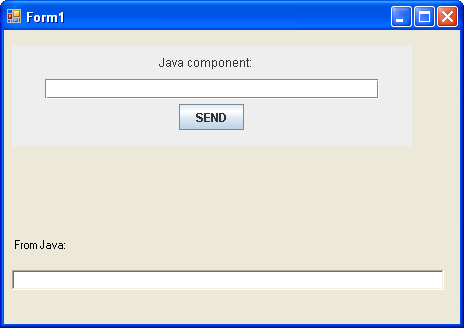
There was an interesting support issue here the other day, asking how to use JNBridgePro-enabled application with ClickOnce.  Let’s say you have a nice WinForms app that contains a Java Swing component:


sample Swing component embedded in a WinForms app

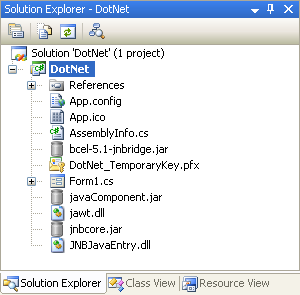
Now, let’s say you want to publish the application to a Web site, so that users can employ ClickOnce to download, unpack, and run the application on demand.  You’ll need to add additional files to the project that aren’t actually referenced in the .NET code: in this case, the unmanaged files JNBJavaEntry.dll and jawt.dll (that need to be in the execution folder), plus the Java-side components jnbcore.jar and bcel-5.1-jnbridge.jar, and any Java files that need to be in the classpath that aren’t on the target machine.  (These Java files need to be jar files; the ClickOnce mechanism doesn’t seem to be able to reconstruct Java folder hierarchies.)  The project, with the added files, might look like this:


Project in Solution Explorer

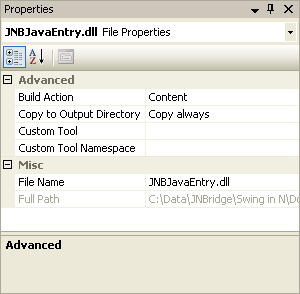
For each of these additional files, you’ll need to make sure that the “Copy to Output Directory” property is set to “Copy Always”:


Properties

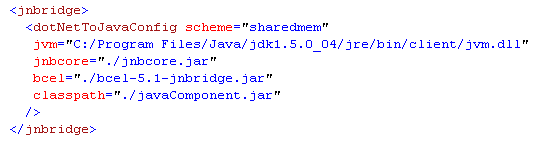
You also need to make sure that the configuration file uses relative paths that reference the current runtime folder:


Configuration file

Then, build the application and publish it.  You now have a self-contained application that can be downloaded from a Web server and launched using ClickOnce.  That’s all there is to it.

It’s still necessary to have a JNBridgePro license installed on the target machine if you want the application to run past the end of the 30-day evaluation period.  An upcoming version of JNBridgePro will have the ability to package a deployment license file with the downloaded application.  Let us know if that’s a feature of interest to you.

Callbacks (part 3)

In the third part of our series on callbacks, we’ll discuss what to do if we have a .NET assembly that implements callbacks using a Java-style listener interface. (See part one: using callbacks in .NET-to-Java projects and part two: callbacks in Java-to-.NET projects.) Since JNBridgePro only supports the delegate/event callback style in Java-to-.NET projects, we need to have a way to convert between the two styles. Here’s one such way. Assume we have the following listener interface:

public interface MyCallbackInterface
{
    bool myCallbackMethod(int param1, string param2);  
}

and the following callback generator

public class CallbackGenerator
{
    public static void registerCallback(MyCallbackInterface theCallback) {…}  
    public static void fire() {…}
}

We can create .NET event-style wrappers that can be proxied as follows:

public delegate bool MyCallbackHandler(int param1, string param2);

public class NewCallbackGenerator
{
    // this is the wrapper to convert listeners to events 
    private class MyCallbackHandlerWrapper : MyCallbackInterface
    {
        MyCallbackHandler mch;
        public MyCallbackHandlerWrapper(MyCallbackHandler mch)
        {
            this.mch = mch;
        }
  
        public bool myCallbackMethod(int param1, string param2)
        {   
            return mch(param1, param2);
        }
    }
  
    // here is the event interface
    public static event MyCallbackHandler MyEvent
    {  
        add
        {
            MyCallbackHandlerWrapper mcw = new MyCallbackHandlerWrapper(value);
            CallbackGenerator.registerCallback(mcw);
        }
    }
  
    public static void fireEvents()
    {   
        CallbackGenerator.fire();
    }
}

You should proxy and use MyCallbackHandler and NewCallbackGenerator as you would any other proxied delegate/event-style callback.

Callbacks (part 2, at long last)

It’s been a while since I’ve blogged (hey, we’ve been busy :-)). I think the best place to pick up is with the long-promised second part of our article on callbacks. In the first part, I wrote about how to register .NET classes as listeners for Java events (in .NET-to-Java projects). In this post, I’ll talk about how to write Java classes that can be registered as listeners for .NET events (in Java-to-.NET projects).

Let’s start by describing the .NET event generator class:

public delegate void MyEventHandler(string message);

public class EventGenerator
{
   public event MyEventHandler myEvent;

   public void fireEvents(string message)
   {
      myEvent(message);
   }
}

The first thing to note is that our .NET event generator class uses events and delegates, rather than Java-style listener interfaces. This is the typical .NET style, and it can be confusing at first if you’re used to Java listeners. Because this is the encouraged .NET style for callbacks (and the way that the .NET Base Class Library does it), it’s the style we support, too. (In the next callback post, I’ll discuss how to create Java callbacks for .NET classes that use listener-style callback interfaces.) The above code includes a delegate type to represent the event handler, and an event (of that delegate type) as part of the event generator class. There’s also a method used to fire all the registered events. To register an event handler in .NET, we typically create a method:

public void sampleEventHandler(string message)
{
   Console.WriteLine(“sample event handler: message = “ + message);
}

then designate it as a delegate and add it to the event:

myEvent += new MyEventHandler(sampleEventHandler);

then, when fireEvents() is called, all such methods added to myEvent will be called. Since delegates and events don’t exist in Java, we need to handle them in a somewhat different way on the .NET side. Start by proxying EventGenerator and MyEventHandler. Include supporting classes. MyEventHandler is proxied as an interface. It has one method, Invoke(), whose signature is identical to that of the underlying delegate:

void Invoke(string);

Our Java callback class must implement MyEventHandler:

public class CallbackClass implements MyEventHandler
{
   // method implementation required by MyEventHandler
   public void Invoke(String message)
   {
      System.out.println("callback fired: message = " + message);
   }
}

The event myEvent in EventGenerator is proxied on the Java side as a pair of methods, add_myEvent() and remove_myEvent(), which are called to add or remove an event handler.

In our Java code, we instantiate EventGenerator (by instantiating its proxy), then instantiate CallbackClass and register it with myEvent. We can do this because CallbackClass implements the proxied delegate MyEventHandler.

// create the event generator
EventGenerator eg = new EventGenerator();</span>

// register an event handler
eg.add_myEvent(new CallbackClass());

Now, when we call eg.fireEvents(), all the registered event handlers will execute, including all Invoke() methods of registered Java-side event handlers.

Note that, just like in the .NET-to-Java situation, in Java-to-.NET projects the .NET side will suspend when it calls the Java-side callback and wait until it returns, in order to preserve the expected callback semantics. As in the .NET-to-Java situation, this can sometimes lead to deadlock, particularly in cases involving multi-threaded applications and GUIs. In the previous callback post, we discussed how this problem was addressed in .NET-to-Java projects through use of the [AsyncCallback] attribute. In Java-to-.NET projects, we do something similar: Java callback classes, in addition to implementing their proxied delegate interfaces, can also implement the marker interface com.jnbridge.jnbcore.AsyncCallback, which has no methods. When the .NET side calls a Java callback object implementing AsyncCallback, it doesn’t wait for the callback method to return, but rather continues on. This means that values returned by asynchronous callbacks, and exceptions thrown by them, are ignored.

In the third post on callbacks, we’ll discuss what to do if we have a .NET assembly that implements callbacks using a Java-style listener interface.

Callbacks (part 1)

Customers sometimes come to us saying they have a .NET-to-Java project, and asking how they can pass a real .NET object to a method in the proxied Java object. Often they’ll subclass a proxy or implement a proxied interface, but when they actually pass the .NET object to the proxy, they get an exception. I explain that what they really are trying to do is to implement a callback: the .NET code has called the Java side, and during that execution, the Java code “calls back” some .NET object that’s previously been registered as a “callback.” If you’re familiar with Java listener interfaces, you’ll know how this all works.

Callbacks are easy to implement. In this post, we’ll discuss how to implement a callback in a .NET-to-Java project. In the next post, we’ll discuss callbacks in Java-to-.NET projects.

Let’s start with a Java class that allows other classes to register themselves as listeners for particular events, then notifies those listeners that those events occur. All listeners must implement a particular listener interface, which must have at least one method that will be executed when the event occurs. The method can take parameters, and can return values or throw exceptions. Here’s a listener interface:

// this is Java
public interface MyListener
{
   public void fireEvent();
}

Now that we’ve got the listener, here’s the event generator class we’ll be working with:

// this is Java
public class MyEventGenerator
{
   private static java.util.ArrayList listeners = new java.util.ArrayList();

   public static void registerListener(MyListener aListener)
   {
      listeners.add(aListener);
   }

   public static void fireListeners()
   {
      for(int i = 0; i &lt; listeners.size(); i++)
      {
         MyListener aListener = (MyListener) listeners.get(i);
         aListener.fireEvent();
      }
   }
}

If we’ve proxied the MyListener and MyEventGenerator classes, we can implement .NET classes that can register themselves with MyEventGenerator as listeners:

// this is C#
[Callback("MyListener")]
public class DotNetListener : MyListener
{
   public void fireEvent()
   {
      Console.WriteLine("event fired!");
   }
}

Note that DotNetListener implements the proxied MyListener interface. Also note that it has the [Callback] attribute. These both are essential. The [Callback] attribute’s class is really com.jnbridge.jnbcore.CallbackAttribute, so you’ll need to make sure you’ve imported that namespace into your program (using the import (if VB.NET) or using (if C#) keywords). The [Callback] attribute needs the fully-qualified name of the interface, so if the interface is in a package, or if it’s nested inside another class, you’ll need to supply the entire name. Also note the method fireEvent() that any class implementing MyListener must implement.

Now we can use DotNetListener wherever a proxy expects a MyListener:

// this is C#
MyEventGenerator.registerListener(new DotNetListener());
MyEventGenerator.fireListener();

The console will now print "event fired!".

Callbacks can take parameters, return values, or throw exceptions, but the parameters, return values, and exceptions must be of classes that the Java side “understands,” which means they need to be proxies, primitives, strings, or arrays of those.

A callback class can implement multiple listener interfaces, but if it does, you’ll need to annotate the callback class with a [Callback] attribute for each listener interface it implements.

One subtlety to be aware of is that when the Java side calls the callback, the Java thread doing the calling suspends until the callback returns. This is done to preserve the expected callback semantics. Since the Java thread has suspended, it’s likely that the .NET thread that originally called the Java side has suspended, since it’s waiting for the Java side to return. Usually this is fine and expected, but sometimes, as when you’re using the callback inside a Windows Form, it can lead to deadlock. To get around this problem, use an asynchronous callback, which is designated using the [AsyncCallback] attribute rather than the [Callback] attribute. When an asynchronous callback is called, the Java-side thread doesn’t wait around until the callback returns, but goes on its way. This avoids the deadlock issue. The tradeoff is that since the Java side doesn’t wait around for the result of the callback, asynchronous callbacks can’t return values or throw exceptions.

That’s all there is to callbacks! In our next post, we’ll explain how callbacks work in the opposite direction: in Java-to-.NET projects.