
Java to TIA Portal: An Equipment Configuration Demo
JNBridgePro · Java → .NET · Demonstration
Use Siemens’ .NET engineering objects from your Java application. JNBridgePro connects the two, so your equipment data and engineering logic can stay in Java.
In this example, Java selects a controller, creates a TIA project and five PLC tags, then checks the saved configuration. The Java application calls Siemens’ Openness API through JNBridgePro-generated proxies, without a separate C# integration application. See the integration overview for where this fits in an existing Java system.
Siemens .NET objects, called from Java
This shortened example creates two of the five signals in the demonstration. The PLC, project, and tag-table objects are Java proxies for real Siemens .NET objects.
PlcTagTable table = plc.Get_TagTableGroup()
    .Get_TagTables().Create("EquipmentSignals");

table.Get_Tags().Create("PartPresent", "Bool", "%M0.0");
table.Get_Tags().Create("RecipeNumber", "Int", "%MW2");

project.Save();JNBridgePro handles the Java/.NET connection. Your application can use these Siemens objects directly while keeping its configuration rules in Java.

Start with the station definition
A Java properties file supplies the controller selection and five memory tags for an assembly station. An existing configurator could supply the equivalent values from its own equipment objects.
- Project
- EquipmentConfiguration
- Device
- AssemblyStation
- PLC
- AssemblyStation_PLC
- Controller
- CPU 1511-1 PN · firmware V2.9
- Order number
- 6ES7 511-1AK02-0AB0
- Tag table
- EquipmentSignals
| Tag name | Data type | Address |
|---|---|---|
| PartPresent | Bool | %M0.0 |
| CycleRequested | Bool | %M0.1 |
| StationReady | Bool | %M0.2 |
| RecipeNumber | Int | %MW2 |
| TargetPosition | Real | %MD4 |
The complete workflow
The full demonstration connects the tag operations to project creation and saved-data verification:
- Create a fresh projectJava creates EquipmentConfiguration in a new output folder.
- Select the controllerThe application checks the installed hardware catalog for the exact CPU order number and firmware.
- Create the device and locate its PLC softwareJava creates the controller and retrieves its software through Siemens’ service API.
- Configure the equipment signalsJava creates EquipmentSignals and all five tags using the input names, types, and addresses.
- Save, reopen, and compareThe application saves and closes the project, opens it again, and checks the persisted values against its input.
Siemens documents the underlying project creation, device creation, and PLC tag operations. JNBridgePro makes these .NET operations accessible to the Java application.
Verify what was saved
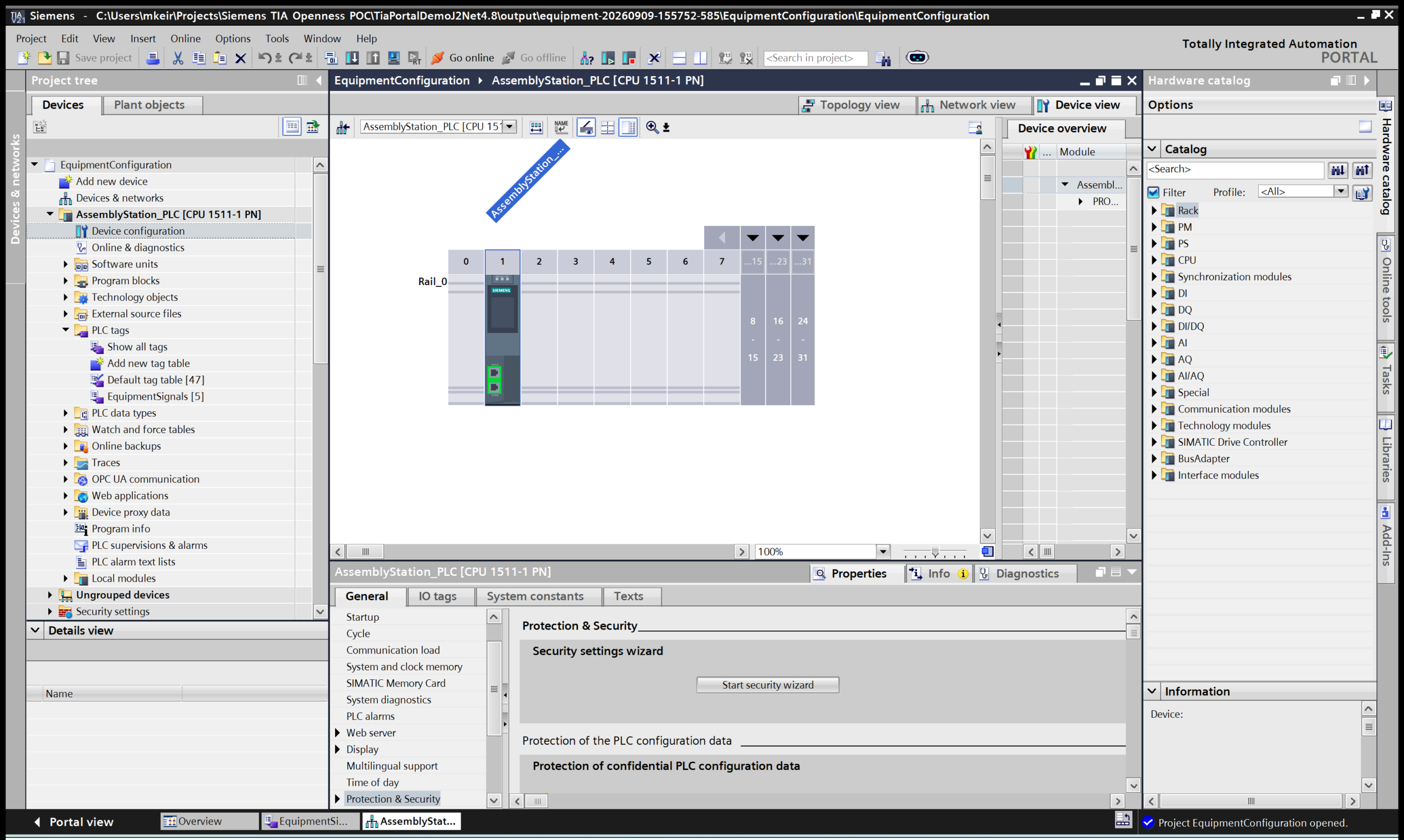
After reopening the project, Java checked the project and PLC names, the tag table, and each tag’s data type and address against the original equipment definition.
A separate Java invocation then opened the same project in a fresh TIA session and read back the controller and five tags. The screenshots show that saved configuration in TIA Portal.
What JNBridgePro handles
JNBridgePro generates Java proxy classes from Siemens’ .NET assemblies and connects proxy calls to the underlying .NET objects. Java can keep references to those objects across multiple engineering operations.
Demonstrated architecture · one Windows engineering workstation
Java application process
Separate Siemens process
Java supplies the configuration. Siemens Openness performs the engineering operations. The output is a saved .ap21 project that can be opened in TIA Portal.
The demo uses shared memory on one Windows workstation. JNBridgePro hosts the .NET client inside the Java process; TIA Portal runs as its own engineering process. The Java application manages the sequence and reads the results.
Keep your engineering logic in Java
A Java machine configurator could use the same pattern to carry its controller selections and signal definitions into TIA Portal. It could then inspect the project and compare the saved values with the expected configuration.
The benefit is keeping that sequence connected to the equipment data and rules the Java application already owns. JNBridgePro provides access to the Siemens .NET objects used in the workflow, without requiring a custom C# service around them.
For a one-time tag-list exchange, file import may be sufficient. The bridge is useful when your Java application needs several related interactions with Siemens project objects.
Demonstration scope
The September 9, 2026 run used Windows 11, Java 21.0.10, .NET Framework 4.8, JNBridgePro 12.1, and TIA Portal V21 with STEP 7 and authorized Openness access. It demonstrated offline project, device, and tag configuration with saved-data checks. PLC program compilation, download, and execution were outside this example.
